

How to plan a website build: a practical project framework
Planning a website build gives a team a clear route from business goals to a working site. It defines the audience, content, structure, design, technology, budget and delivery stages before development begins.
A strong website project plan links business objectives to measurable outcomes, a practical site structure and an ordered delivery plan. The process also sets clear ownership, reduces rework and gives every contributor a shared standard for decisions.
The full guide explains how teams can shape the brief, plan content and navigation, select the technical foundation, manage delivery and test the site before launch.
Key takeaways
- Define the audience, objectives and measures of success.
- Map the site structure, content and technical requirements.
- Sequence delivery, testing and launch activities.
Define the brief, audience and success measures

A sound brief links business goals to audience needs, measurable outcomes, delivery constraints and a clear market position. It gives the discovery phase a firm boundary and helps the project team make consistent decisions throughout the website project plan.
Set website goals and KPIs
The business should define what the website must achieve before anyone selects a platform, structure or visual style. A business website might need to generate qualified enquiries, while an ecommerce store may need to increase completed purchases, average order value or repeat orders. A professional website may prioritise bookings, applications or brand awareness.
Each goal needs a measurable key performance indicator (KPI) and a target period. Useful measures include:
- Qualified leads by month
- Enquiry form completion rate
- Product conversion rate
- Average order value
- Organic search traffic to priority pages
- Booking or application completions
- Revenue attributed to the online store
The team should define the measurement method, data owner and reporting frequency. It should also record baseline figures where available and separate primary KPIs from supporting measures such as page views or time on page.
Research buyer personas and pain points
Buyer personas should reflect real customer groups, not broad labels such as “everyone” or “small businesses”. The team should document each group’s role, buying trigger, decision criteria, objections, preferred channels and level of product knowledge.
Research can combine customer interviews, sales call notes, support requests, search queries and website analytics. It should identify the problem that brings each visitor to the site, the information they need before taking action and the factors that may stop them.
For each persona, the brief should capture:
- Primary pain points and desired outcomes
- Questions raised during the buying process
- Evidence required to build trust
- Accessibility, device or language needs
- The action the website should support
These findings should shape navigation, page content, calls to action and the order in which information appears.
Review competitor websites and define your unique selling proposition
A competitive analysis should examine websites that target the same buyers, including direct competitors and credible alternatives. The team should review their positioning, navigation, pricing information, product detail, proof, calls to action, search visibility and mobile experience.
A comparison table can expose gaps without copying another brand:
Area Competitor pattern Opportunity Positioning Broad service claims State a specific customer outcome Product information Limited technical detail Explain fit, limits and implementation Trust General testimonials Show relevant evidence and named use cases Conversion Several competing actions Prioritise one action per pageThe unique selling proposition should state why the target audience should choose the business instead of a competitor. It must connect a specific customer need with a credible difference, then appear consistently across the homepage, service pages, product pages and sales content.
Document scope, budget and project requirements
The brief should define what the project will deliver and what it will not deliver. Scope may include information architecture, copywriting, branding, design, development, ecommerce functionality, migration, search optimisation, analytics, training and ongoing support.
The project requirements should specify:
- Required pages, templates and user journeys
- Content ownership, approval stages and deadlines
- Integrations such as CRM, payment or stock systems
- Technical, security and accessibility requirements
- Hosting, domain, maintenance and support arrangements
- Launch dependencies and acceptance criteria
The budget should cover delivery and continuing costs, including software subscriptions, content production, hosting and maintenance. The project plan should assign decision owners, identify dependencies and record risks such as incomplete content or delayed system access. Clear boundaries prevent unplanned features from changing the timeline or weakening the core website goals.
Create the site architecture and content plan
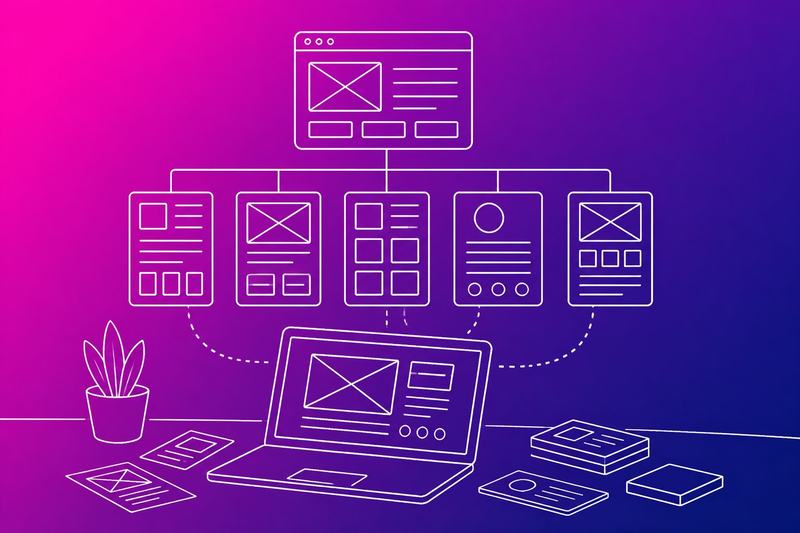
A strong website structure gives each page a clear role, supports user journeys and makes content easier to find. The plan should connect page hierarchy, conversion goals, SEO requirements, content ownership and the assets needed for launch.
Build a sitemap and page hierarchy
The sitemap should show every planned URL and its position within the website structure. It should start with the homepage, then group pages by user need, product area, service line or audience.
A typical hierarchy may include:
- Homepage
- About page
- Product or service pages
- Landing pages for campaigns
- Blog and blog posts
- Contact and support pages
- Legal and policy pages
Each page should have one primary purpose, one target audience and one main call to action. The hierarchy should remain shallow enough for users to reach important information quickly. The sitemap should also identify pages that need redirects, pages that should remain out of search results and pages that require approval before publication.
Map core pages and conversion journeys
The plan should map how different visitors move from entry point to action. A potential customer might enter through a search-optimised blog post, review a product page, read testimonials and submit a contact form. Another might arrive through email marketing and go directly to a campaign landing page.
For each journey, the team should record:
- The likely entry page
- The information the visitor needs next
- The relevant internal links
- The primary call to action
- The confirmation or follow-up step
Product pages should explain the offer, evidence, pricing or buying process and next action. Landing pages should remove distractions and match the campaign message. The homepage should direct different audiences towards their most relevant route rather than trying to explain every detail.
Plan content, SEO and internal linking
The content strategy should define which questions each page answers and which search terms it targets. The SEO strategy should cover page titles, headings, descriptions, structured content, accessible URLs and useful information rather than repeating keywords.
Blog posts can attract visitors who need advice before they are ready to buy. Each post should link to a relevant product page, service page or contact route. Core pages should also link to supporting blog content where it helps visitors make a decision.
A content plan should include the format, owner, review date and intended action for each item. It should distinguish between website content that supports conversion and content created mainly for education, retention or email marketing.
Prepare assets and editorial ownership
The team should list every required asset before content creation begins. This may include product photos, team photos, diagrams, testimonials, video, logos, downloadable documents and interface screenshots.
Each asset should have a named owner, usage rights, source file, delivery date and optimisation requirement. Images should use suitable dimensions, descriptive file names, accessible alternative text and efficient file sizes. Image optimisation should preserve quality while limiting page weight.
Editorial ownership should cover drafting, subject review, legal approval, publishing and future updates. A content register can record each page, its responsible owner, last review date and next action. This prevents outdated pricing, unsupported claims and inconsistent calls to action from remaining live.
Specify the design, platform and technical foundation
A practical website design plan connects brand elements, page structure, platform choice and technical requirements. It should define how the site looks, how users move through it and how the team will manage it after launch.
Turn brand elements into a visual system
The operator should convert the logo, colour schemes, fonts and tone of voice into a repeatable visual system. The system should specify primary and secondary colours, approved logo variations, heading and body typography, button styles, spacing and image treatment.
The visual style should support the brand’s purpose and make important actions easy to identify. For example, a service site might use one strong accent colour for calls to action, while neutral backgrounds keep pricing and contact information readable.
The design specification should also cover content rules. It can define headline length, voice, icon style and photography requirements. A designer can then apply the same rules across the home page, service pages, forms and confirmation screens without making isolated visual decisions.
Accessibility needs to shape the system from the start. Text should remain legible at different sizes, colour combinations should provide sufficient contrast and links should remain clear without relying only on colour.
Use wireframes to test layout and usability
Wireframes show the page layout before visual design begins. They should place navigation, headings, content blocks, forms, calls to action and supporting information in a clear order.
The team should create wireframes for key journeys rather than every possible page. Useful examples include landing on a service page, finding contact details, completing an enquiry form and reading an article on a mobile device.
Each wireframe should answer practical questions:
- Can users identify the page purpose immediately?
- Does the primary action appear at the right point?
- Can users move between related pages?
- Does the layout work without images or colour?
- Can keyboard users reach every control?
Testing wireframes early makes changes cheaper than revising coded pages. The team should review them with staff who understand customer questions and with representative users where possible. Responsive design should cover narrow mobile screens, tablets and larger desktop displays rather than treating the desktop layout as the default.
Choose between a builder, CMS or custom development
A website builder suits a small team that needs a fast launch and limited technical maintenance. A drag-and-drop website builder can provide templates, hosting and standard editing controls, while an AI website builder may help create an initial structure that still requires human review.
A content management system gives the team more control over content types, extensions and hosting. Managed hosting can simplify setup, but the operator still needs a process for updates, backups, plugin selection and access permissions.
Custom coding suits requirements that standard platforms cannot handle efficiently. A professional web designer or developer may build the interface with HTML and CSS, add behaviour with JavaScript and connect it to custom services or data systems.
The decision should compare budget, delivery time, editorial control, integrations, performance, security and ownership. Templates reduce design effort but can constrain page structure. Custom development increases control but creates a larger maintenance responsibility.
Select domain, hosting and security requirements
The operator should choose a domain name that matches the organisation and remains easy to say, type and remember. The registration account should use a controlled business email address, with renewal reminders and multi-factor authentication where available.
The hosting provider and hosting plan should match expected traffic, storage, technical requirements and support needs. The specification should identify whether the site needs managed hosting, database access, server-side processing, scheduled backups or staging environments.
SSL should protect connections between visitors and the website. The team should confirm that HTTPS covers every page, redirects from HTTP and renews automatically or through a documented process.
Security requirements should include role-based access, strong administrator credentials, software updates, malware monitoring and tested backups. If the site offers live chat, forms or account features, the operator should define data retention, privacy notices and access controls before launch. The technical plan should also record who manages the domain, hosting account and recovery details.
Sequence delivery, test and launch
A controlled website launch depends on phased ownership, evidence-based testing, measurable goals and a documented release process. Teams should connect the website structure, content, technical controls and search requirements before exposing the finished build to the public.
Build a phased delivery plan with clear owners
The project lead should divide the web development project into stages that match its risks and dependencies. A practical sequence is discovery, design, content production, development, testing, launch and post-launch improvement. Each stage should have a named owner, an agreed output and a clear approval point.
A website planning template can track tasks, dependencies, deadlines and decision-makers. The design phase should confirm responsive design, navigation, page layouts and key user journeys before development begins. Website goals should determine which journeys take priority, such as requesting a quote, booking a consultation or completing a purchase.
The team should release work in controlled batches rather than treating the website as one indivisible delivery. For example, it might launch core service pages first, then add resources, account features or regional content after the main experience proves stable. Each batch needs acceptance criteria covering content, functionality, performance, accessibility and SEO.
Validate content, performance and accessibility
The test plan should cover representative pages, devices, browsers and user journeys. Reviewers should check headings, links, forms, error messages, images, downloads and structured website content. They should also confirm that the website structure supports clear navigation and that every important page has an accurate title and description.
Performance testing should measure page loading, layout stability and interaction responsiveness on realistic mobile connections. The development team should compress images, remove unused scripts and verify caching before launch. Responsive design testing should include narrow screens, large screens, keyboard navigation and zoomed text.
Accessibility checks should include keyboard-only operation, visible focus states, meaningful link text, form labels, colour contrast and alternative text. Manual review remains necessary because automated checks cannot judge every user journey. Content owners should approve the final copy, prices, contact details and legal information before release.
Configure measurement and search readiness
The team should define a measurement plan that connects website goals to KPIs. Website analytics can record events such as form submissions, purchases, downloads and calls when configured with the required consent controls. Each event should have a documented name, trigger and purpose so reports remain consistent after future releases.
Search engine optimisation should begin before launch, not after pages become public. The team should map target queries to useful pages, set canonical URLs, create an XML sitemap and configure robots.txt carefully. It should also check redirects, internal links, indexability, structured data and metadata across the website.
If the site uses an SEO plugin, its settings should support the approved structure rather than replace editorial judgement. The team should review AI tools carefully when they assist with content or metadata. Human owners must verify accuracy, originality, tone and compliance before publication.
Run the launch checklist and improve after release
Before the website launch, the release owner should confirm the production environment, domain settings, SSL certificate, backups and rollback plan. The team should test forms, email delivery, payments, authentication, redirects, analytics, cookie consent and third-party integrations in the live environment or an equivalent staging setup.
A launch checklist should record each approval and the person responsible. It should include removing unwanted noindex directives, submitting the sitemap to search services, checking priority URLs and monitoring server errors. The team should schedule the release when the responsible technical and business owners can respond quickly.
After release, the team should monitor uptime, performance, crawl errors, conversions and support requests. It should compare results with the agreed KPIs, prioritise defects by user impact and document each change. A short review should identify which assumptions held, which journeys failed and which improvements belong in the next delivery cycle.
Frequently asked questions
A practical website plan defines its purpose, audience, content, structure, platform and required features. It also sets clear ownership, priorities and checks before development begins.
What are the first steps in planning a new website?
The project owner should define the website’s business purpose, target users and primary actions. They should then audit existing content, review competing websites and record technical or legal requirements.
The plan should identify decision-makers, delivery stages, budget assumptions and launch constraints. This prevents design and development work from starting before the project has clear boundaries.
How do I define the goals and target audience for a website?
The team should link each goal to a measurable outcome, such as completed enquiries, product purchases, account registrations or support requests. Each goal should have an owner and a method for tracking progress.
The audience definition should cover user needs, knowledge level, device use, location and likely barriers. User interviews, customer data and support records can provide evidence instead of relying on assumptions.
What pages should a website include?
Most websites need a homepage, an about or organisation page, service or product pages, a contact page and relevant legal information. The exact set depends on the organisation, audience and conversion path.
A content audit should identify pages to keep, combine, rewrite or remove. Each page should have one primary purpose, a defined audience and a clear next action.
How do I create a website structure and sitemap?
The team should group content by user need and business function, then arrange it into a shallow, logical hierarchy. Navigation labels should use familiar terms that describe the destination accurately.
A sitemap should list page names, URLs, parent sections, content owners and status. The team can test the structure with representative users before development to identify confusing paths.
What should be included in a website planning template?
A useful template should include the project purpose, goals, audiences, scope, stakeholders, content inventory, sitemap, page requirements and technical constraints. It should also record accessibility, security, privacy and compliance needs.
Each planned page should have a title, URL, purpose, audience, content format, call to action, owner and review status. The template should track dependencies, decisions, risks, acceptance criteria and launch tasks.
How do I choose the right platform and features for a website?
The team should start with content operations, integrations, access control, performance, accessibility, security and future maintenance. The platform should support the required workflows without adding features that the organisation cannot operate or secure.
They should list each feature as a user or business requirement, then rank it as essential, useful or optional. Platform testing should cover publishing, editing, permissions, search, analytics, backups and integration with existing systems.
Run this check
See how a site measures up on the basics before you act on any of this. Get a free website audit: enter a URL and an email, and we check the public pages on our servers, never logging in and never touching your files. The findings come back with the page, the reason and the fix.