
Cloud hosting basics for operators: core architecture and controls
Cloud hosting moves website hosting from a single server to shared, distributed infrastructure. Operators manage compute, storage, networking and access through cloud hosting services, while cloud computing provides the capacity to run and scale applications.
Operators need clear service boundaries, measured capacity, controlled costs and tested recovery paths to run cloud hosting reliably. The article explains how those parts connect, which deployment patterns suit different workloads and where operational responsibilities sit.
Key takeaways
- Cloud hosting combines scalable infrastructure with operational responsibility.
- Capacity, performance and cost require continuous measurement and control.
- Security and resilience depend on clear boundaries and tested procedures.
The operating model behind cloud infrastructure
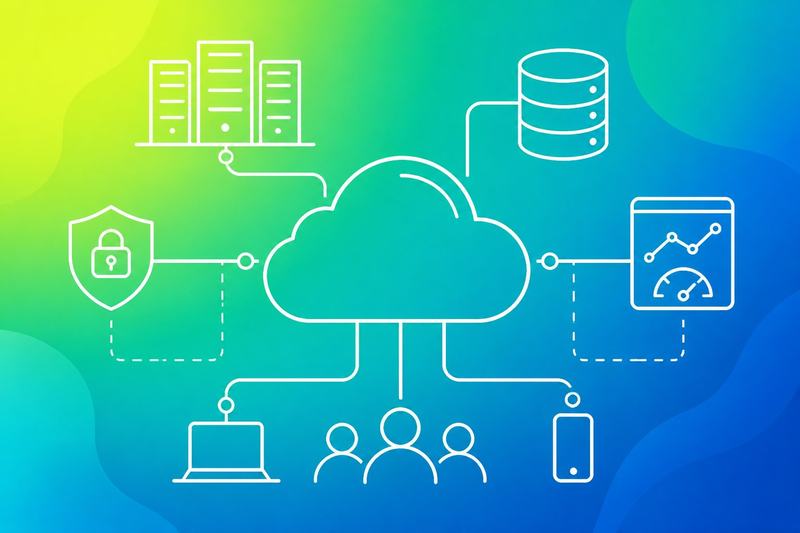
Cloud infrastructure combines physical resources in data centres with software-defined controls. Operators manage virtual servers, allocate CPU and memory, attach storage and direct traffic across interconnected servers.
From physical servers to virtual machines
Cloud providers operate fleets of physical servers in secured data centres. Each server supplies CPU, RAM, local storage and network connections, while a hypervisor divides its capacity into isolated virtual machines (VMs).
A VM behaves like a server with its own operating system, virtual CPU, memory allocation, storage devices and network interface. The provider can create, stop, resize or replace it through an API without changing the underlying hardware.
Virtualisation improves utilisation because several workloads can share one physical server. It also creates an operational boundary: a failed VM can be rebuilt on another host, but a host failure can affect every VM running on it. Operators therefore need placement rules, health checks and recovery procedures.
Compute, memory, storage and networking
Compute refers mainly to CPU capacity. A workload with high request rates, encryption or data processing may need more virtual CPUs, while a simple web service may need fewer. CPU allocation does not guarantee constant performance if the provider shares physical capacity.
Memory, or RAM, holds active application data and operating-system processes. When a cloud server runs short of RAM, it may swap data to storage or terminate processes, both of which can reduce reliability.
Storage has different performance and durability characteristics. Block storage provides disk-like volumes for operating systems and databases. Object storage suits files and backups. Operators should define capacity, latency, throughput, retention and backup requirements separately.
Networking connects cloud servers, storage services and external users. Security groups, routing tables and private networks control which interfaces can communicate and on which ports.
How load balancing and redundancy route requests
A load balancer receives client requests and selects a healthy cloud server from a configured pool. It can distribute traffic by round robin, connection count or other rules, then remove an instance when health checks fail.
A typical path looks like this:
- DNS directs the client towards the service endpoint.
- The load balancer accepts the connection.
- Health checks identify suitable virtual servers.
- The application instances process the request.
- The data tier returns or stores the required information.
Redundancy requires more than running several instances. Operators should place them across separate physical hosts, failure domains or availability zones, then replicate important data and test failover. High availability also depends on removing single points of failure in DNS, networking, storage and deployment processes.
Capacity, performance and cost control

Operators need enough capacity for normal demand, a safe response to traffic spikes and clear limits on spending. They should match resource allocation to workload behaviour, then measure latency, utilisation and cost before changing the design.
Scaling safely for traffic spikes
Auto-scaling adds or removes instances as demand changes. Operators should set minimum and maximum instance counts, define scaling thresholds and allow enough startup time for new capacity to become healthy. Health checks must remove failed instances without causing a replacement loop.
Traffic spikes can exhaust databases, connection pools or third-party API limits before they exhaust compute capacity. Operators should protect these boundaries with request queues, rate limits, circuit breakers and cached responses. A load balancer should send traffic only to healthy instances.
Operators should test scaling with representative load rather than waiting for a production incident. They should monitor latency, error rates, queue depth and capacity during the test. Manual approval may suit workloads with costly or stateful resources, while stateless services usually support faster auto-scaling.
Choosing resource allocation and SSD storage
Resource allocation should reflect the workload. CPU-heavy services need sufficient virtual CPUs, memory-bound services need adequate RAM and stateful systems need reliable storage capacity, input/output operations and recovery options. Operators should avoid assigning dedicated resources unless noisy neighbours or predictable performance justify the added cost.
SSD storage usually provides lower latency and higher input/output performance than magnetic storage. It suits databases, search indexes, transactional services and frequently accessed application data. Operators should still choose capacity, performance tiers and replication based on measured demand rather than selecting the fastest option by default.
Caching can reduce database load and improve response times for repeated reads. The design should define cache ownership, expiry rules and behaviour when cached data becomes unavailable. Monitoring should distinguish application latency from storage latency so operators can identify the actual constraint.
Using pay-as-you-Go pricing without waste
Pay-as-you-go pricing charges for consumed resources rather than requiring a large fixed purchase. This model supports flexibility during testing and variable demand, but idle instances, unattached disks, unused public addresses and excessive data transfer can reduce cost efficiency.
Operators should tag resources by service, environment and owner. A regular review can identify low-utilisation instances, stale snapshots and storage that has outgrown its purpose. Scheduled shutdowns can reduce development costs, while reserved or committed pricing may suit workloads with stable, long-term demand.
Budgets and spending alerts should cover each account or project. Cost reports should combine resource usage with performance data, since reducing capacity can increase latency or trigger failures. Operators should set scaling limits and review pay-as-you-go pricing whenever traffic patterns, storage growth or architectural boundaries change.
Resilience, security and operational boundaries
Reliable cloud operations depend on planned failure handling, tightly scoped access and clear provider boundaries. Operators must know which controls they manage, which controls the provider manages and how both sides support uptime, recovery and compliance.
Designing for uptime and disaster recovery
Operators should remove single points of failure from the application path. They can distribute workloads across availability zones, use health checks and route traffic only to healthy instances. A second region can improve disaster recovery, but it adds cost, latency and data replication considerations.
They should define recovery time objectives (RTO) and recovery point objectives (RPO) for each service. Backups need encryption, retention rules and regular restore tests. A backup that has never been restored does not prove recoverability.
Operational runbooks should cover regional outages, failed deployments, lost credentials and corrupted data. Monitoring must alert on service health, capacity, replication lag and backup failures. Operators should test failover without assuming that automated recovery will work under every failure condition.
Applying access control and encryption
Access control should follow least privilege. Operators should assign permissions to roles rather than individuals, separate production access from development access and remove unused accounts promptly. Strong authentication, preferably with multi-factor authentication, should protect administrative consoles and privileged actions.
SSH access should use managed keys or certificates, disable direct root login and restrict allowed source networks through firewalls or private connectivity. Security groups and network firewalls should expose only required ports. Intrusion detection systems can identify suspicious traffic, privilege escalation and repeated authentication failures.
Data should use encryption in transit through current TLS configurations and encryption at rest through managed keys or customer-controlled keys where required. Operators should control key access, rotation and recovery separately from application access. They should apply security patches through tested, repeatable processes and record exceptions with an expiry date.
Meeting SLA and compliance requirements
A service level agreement (SLA) should state the covered service, uptime measurement, exclusions, support response targets and service credits. Operators should compare the SLA with their own availability objectives because a provider SLA does not guarantee application uptime.
They should document the selected region, data residency rules, backup locations and cross-region replication. These choices can affect GDPR obligations, contractual requirements and sector-specific controls such as HIPAA. Compliance depends on the full service design, not only on a provider certificate.
Operators should maintain evidence for access reviews, patching, incident response, backup tests and change approvals. They should review the provider’s shared-responsibility statement and compliance reports, then map each required control to an owner. Contracts should define notification duties, audit support, data deletion and exit procedures.
Selecting services and deployment patterns
Operators should match hosting to workload behaviour, operational skill and failure tolerance. The main decisions cover tenancy, control, scaling, data location, provider capability and the boundary between infrastructure and managed services.
Comparing shared, VPS, dedicated and cloud hosting
Shared hosting places many sites on one managed platform. It suits small content-managed sites with predictable traffic, but limited CPU, memory, configuration access and noisy-neighbour risk restrict operational control. Traditional hosting often includes DNS, backups and basic support.
A VPS hosting plan provides a virtual private server with allocated resources on shared physical servers. It gives operators root access, custom services and clearer isolation than shared hosting. They still manage patching, monitoring, security and capacity unless the provider offers managed administration.
Dedicated hosting assigns a physical server to one customer. It supports sustained workloads, specialist hardware and strict isolation, but scaling requires procurement or migration. Cloud servers use pooled infrastructure and usually allow faster resizing, snapshots and multi-zone designs. They can also introduce variable costs and more complex networking.
Public, private and hybrid cloud choices
Public cloud hosting runs workloads on infrastructure operated by the large cloud providers. Their compute services provide infrastructure as a service (IaaS), while platform as a service (PaaS) reduces operating-system and runtime administration. SaaS removes more infrastructure responsibility by delivering a complete application.
A private cloud dedicates the environment to one organisation, either on its premises or through a hosted provider. It can support particular security, compliance or network requirements, but the organisation must fund and operate more of the platform.
Hybrid cloud hosting connects private systems with public cloud services. Operators should define the boundary precisely, including identity, DNS, routing, data replication and recovery ownership. A startup may keep a database private while using public cloud compute, a CDN and managed analytics. Machine learning and big data workloads may also use temporary public capacity when data governance permits.
Assessing providers, support and delivery services
Operators should compare cloud hosting providers by region availability, service limits, pricing models, incident history, security controls and exit options. They should test quotas, network paths, backup restoration and account recovery before production use. The major providers offer different balances of managed services, geographic coverage, pricing and operational complexity.
Support must match the workload. A basic ticket service may suit a low-risk site, while business-critical systems need defined response targets, escalation routes and incident communication. The provider should document maintenance practices, service dependencies and customer responsibilities.
Delivery services also shape performance. A content delivery network (CDN) can cache static assets near users, while authoritative DNS and health checks can direct traffic between endpoints. Operators should record who owns certificates, DNS zones, backups, deployments and rollback decisions. Managed hosting, PaaS and deployment services can reduce routine work, but they do not remove the need to monitor application behaviour and data recovery.
Frequently asked questions
Cloud hosting uses virtualised compute, network and storage resources that providers allocate through software. Operators must understand service models, provider selection, usage-based pricing and the routine controls that keep workloads secure, available and observable.
What is cloud hosting and how does it work?
Cloud hosting runs applications on virtual machines, containers or managed platforms in a provider’s data centres. The provider supplies physical servers, networking, storage and facilities, while the operator configures workloads through a console, API or infrastructure-as-code.
The operator typically selects a region, allocates resources, attaches storage and defines network access. The platform then places the workload on available infrastructure and can add or remove capacity when its configuration or scaling rules require it.
How does cloud hosting differ from traditional web hosting?
Traditional hosting commonly assigns a site to one server, a shared hosting account or a fixed virtual server. Cloud hosting separates compute, storage and networking into software-managed resources that operators can resize, replicate or replace.
Cloud hosting usually provides API access, multiple availability zones and usage-based billing. It also requires more operational work, including identity management, network design, patching choices, monitoring and cost control.
What are the main types of cloud service models?
The main service models are:
- Infrastructure as a Service (IaaS): The provider manages physical infrastructure while the operator manages virtual machines, operating systems, networks and applications.
- Platform as a Service (PaaS): The provider manages more of the runtime, scaling and operating system. The operator deploys application code and configures supported services.
- Software as a Service (SaaS): The provider runs the complete application. The customer manages users, data, access policies and service configuration.
Managed databases, serverless functions and container platforms often sit between these categories. The more the provider manages, the less infrastructure work the operator performs, but the less control the operator has over the runtime.
Which cloud hosting provider is best for beginners?
No single provider suits every beginner. A suitable choice depends on the workload, required region, supported services, documentation, support options and the operator’s existing skills.
A beginner can compare a simple virtual machine service, a managed database and basic object storage from several providers. They should check quota limits, backup features, identity controls, network charges and whether the provider offers clear cost estimates before deploying production workloads.
A smaller provider may offer simpler products and predictable pricing. A larger provider may offer broader services, more regions and deeper integration, but its account structure and billing model can take longer to learn.
How is cloud hosting priced and what affects the cost?
Cloud hosting commonly charges for resource consumption. Cost can include compute time, memory, attached storage, database capacity, public IP addresses, data transfer, managed services, backups and support plans.
Pricing changes with region, instance size, operating system, purchase commitment and traffic patterns. Operators should separate fixed baseline costs from variable usage and set budgets, alerts and resource tags before workloads expand.
A cost estimate should model normal usage, peak usage and retained data. Operators should also check charges between availability zones and regions because network transfer can become a significant part of a distributed system’s bill.
What operational tasks are needed to run workloads reliably in the cloud?
Operators need defined ownership, least-privilege access and separate environments for development, testing and production. They should manage infrastructure through reviewed configuration, record changes and remove unused resources.
Reliable workloads need health checks, centralised logs, metrics, traces and alerts tied to actionable conditions. Operators should test backups and restores, apply security updates, rotate secrets and review exposed network paths.
They should also document deployment and rollback procedures, set capacity thresholds and test failure scenarios. Regular reviews should cover availability, recovery objectives, access permissions, vulnerabilities and monthly cloud spend.
Run this check
See how a site measures up on the basics before you act on any of this. Get a free website audit: enter a URL and an email, and we check the public pages on our servers, never logging in and never touching your files. The findings come back with the page, the reason and the fix.