How to secure your business email from cyber threats
Business email security protects accounts, payments and sensitive data from threats such as phishing, malware and ransomware. Attackers can use stolen credentials or convincing messages to trigger business email compromise (BEC), redirect payments or expose customer information.
Businesses can secure email by enforcing multi-factor authentication, filtering suspicious messages, training staff to verify requests and monitoring accounts for unusual activity. Strong access controls and tested response procedures also limit damage if an account or message is compromised.
Key takeaways
- Multi-factor authentication reduces the risk of account takeover.
- Verification procedures help prevent phishing and fraudulent payments.
- Monitoring and response controls limit breaches and data loss.
Lock down email accounts first

Email accounts should resist phishing, password reuse and unauthorised access from unmanaged devices. Strong authentication, unique passphrases and clear access controls reduce the chance that a stolen credential becomes an account takeover.
Require phishing-resistant MFA
Passwords alone cannot reliably protect workspace email accounts. Attackers can steal them through phishing, malware or credential stuffing, then read messages, impersonate staff or reset other services.
Administrators should require multi-factor authentication (MFA) for every user, with security keys such as a YubiKey preferred for administrators, finance staff and users who handle sensitive data. Security keys provide phishing-resistant authentication because they verify the genuine sign-in site.
Authenticator apps provide stronger protection than passwords alone. Microsoft Authenticator and Google Authenticator support time-based codes, while push approvals can still be abused through repeated prompts. If an organisation uses push MFA, it should enable number matching and location or device details where the service supports them.
Administrators should block SMS-based two-factor authentication (2FA) where practical. They should also record recovery methods, issue spare security keys through a controlled process and test account recovery without weakening MFA requirements.
Set long, unique passwords
A reused password can expose several services after one breach. Attackers use credential stuffing to test leaked usernames and passwords against email, cloud storage, payroll and customer systems.
Each account should use a long, unique passphrase that no other service shares. A password manager can generate and store random passwords, reducing manual reuse and enabling controlled sharing for approved service accounts. The password manager itself needs a strong master passphrase and MFA.
Administrators should prohibit passwords based on company names, seasons, predictable substitutions or publicly available staff information. They should also remove default credentials, rotate passwords after confirmed exposure and revoke active sessions when compromise is suspected.
Password policies should support length and password-manager use rather than forcing frequent, predictable changes. MFA remains necessary because a strong password can still be disclosed through phishing or an infected device.
Control access to mailboxes and devices
Excessive mailbox permissions allow one compromised account to expose other users’ messages, contacts and files. Unmanaged phones and laptops can also retain email data after a device is lost or a staff member leaves.
Administrators should apply least-privilege access controls. They should review delegates, shared mailboxes, forwarding rules, transport rules and administrator roles on a fixed schedule. Access should expire when a project ends, and leavers’ sessions, tokens and app passwords should be revoked promptly.
SSO can centralise sign-in and enforce consistent MFA, but it must protect the identity provider as carefully as email. Workspace administrators should use separate accounts for administration and daily email, with alerts for suspicious sign-ins and mailbox-rule changes.
Mobile device management (MDM) can require screen locks, encryption, supported operating systems and remote removal of corporate email. It should block access from devices that fail those controls and maintain an inventory of devices connected to business accounts.
Stop phishing, spoofing and fraudulent payments
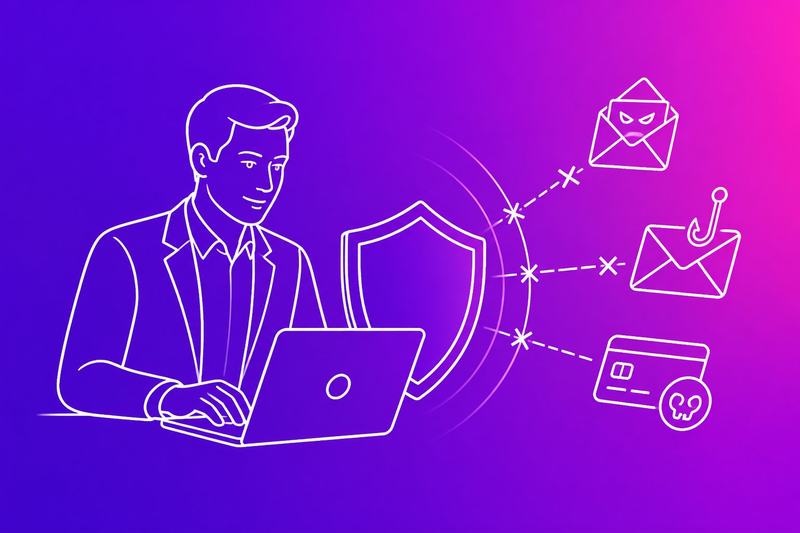
Phishing attacks and business email compromise (BEC) often exploit trusted names, urgent requests and familiar payment processes. Strong staff controls, practical reporting routes and authenticated sending domains reduce the chance that social engineering, email spoofing or fraudulent payments reach customers or finance teams.
Train staff to verify high-risk requests
Attackers may impersonate a director, supplier or customer and request a payment, bank-detail change, password or sensitive file. Staff should treat urgency, secrecy, unusual language and requests to bypass normal approval as warning signs, even when the message appears to come from a known contact.
An email security policy should require independent verification for high-risk actions. The recipient should call a known telephone number, use an established supplier portal or confirm the request with the supposed sender through a separate channel. They should not use contact details or links supplied in the suspicious email.
Payment teams should apply dual approval and record changes to supplier bank details. Staff should avoid opening unexpected attachments, entering credentials into linked pages or replying to suspected phishing messages. Security awareness training should show staff how to inspect the full sender address, check links and report concerns without delay.
Use phishing simulations and clear reporting routes
Phishing simulations can test whether staff recognise credential requests, fake invoices and fraudulent payment instructions. They should reflect the organisation’s real risks without collecting unnecessary personal data or embarrassing individuals. Managers should use the results to improve training, procedures and technical controls rather than punish honest mistakes.
Every employee should know how to report a suspicious message. The reporting route could use an email button, a dedicated mailbox or the organisation’s service desk. It should preserve the original message and relevant headers where possible, because analysts may need them to identify spoofing, malicious links or related messages.
The response process should define who investigates, who contacts the affected account holder and who can pause a payment. If someone entered credentials or opened a harmful attachment, the organisation should provide an immediate route for password resets, device checks and incident escalation.
Authenticate sending domains with SPF, DKIM and DMARC
SPF, or Sender Policy Framework, lists the servers allowed to send email for a domain. DKIM, or DomainKeys Identified Mail, adds a cryptographic signature that receiving systems can check. DMARC, or domain-based message authentication, reporting and conformance, tells receiving systems how to handle messages that fail SPF or DKIM alignment.
The organisation should inventory legitimate senders first, including marketing platforms, support systems and bulk email services. It should publish SPF and DKIM correctly, then deploy DMARC in monitoring mode to review reports and identify unauthorised sources. After correcting legitimate sending services, it can move towards quarantine or reject policies.
These email authentication protocols help prevent direct domain spoofing and improve email deliverability, but they do not detect every compromised account or deceptive lookalike domain. Staff controls, mailbox security and payment verification must continue alongside SPF, DKIM and DMARC.
Filter threats and protect sensitive messages
A secure email gateway should stop spam, malware, malicious links and unsafe attachments before they reach staff. Encryption and data loss prevention should then protect legitimate messages from eavesdropping, unauthorised access and accidental disclosure.
Block malicious links and attachments
A secure email gateway should combine anti-spam controls, antivirus software, reputation checks and machine learning to inspect inbound and outbound mail. It should reject known malware, quarantine suspicious spam and rewrite or scan links when a user clicks them.
Attackers often hide malware in Microsoft Office files, PDFs, archives or HTML attachments. Gateway policies should block dangerous file types, restrict password-protected archives and use sandboxing to open unfamiliar files in an isolated environment before delivery.
Staff should receive only the attachment types their roles require. The gateway should quarantine suspicious messages and provide administrators with the sender, reason for detection and inspection results. Products such as Proofpoint, Mimecast and Barracuda offer secure email gateway features, but each organisation should test detection rules against its own workflows.
Encrypt confidential email in transit and end to end
Without encryption, attackers monitoring an unsecured network may read email in transit. Organisations should require TLS, or Transport Layer Security, for connections between their email gateway and trusted recipients, while monitoring failed or downgraded connections.
TLS protects the connection but does not necessarily protect a message after a provider stores it. For sensitive content, S/MIME, PGP or OpenPGP can provide end-to-end encryption when both parties manage keys correctly. The sender should verify recipient certificates or public keys to reduce the risk of man-in-the-middle attacks.
Policies should identify messages requiring encrypted email, such as contracts, credentials and regulated records. Services including Proton Mail, Tuta and Gmail offer different encryption features, so administrators should check whether encryption remains active between the sender, provider and recipient.
Prevent sensitive data from leaving the business
Data loss prevention (DLP) should inspect message content, recipients and attachments before delivery. It can detect patterns linked to payment card data, identity numbers, passwords, PHI and confidential documents, then block, quarantine or require approval for risky messages.
DLP rules should consider context rather than relying only on keywords. A message containing a patient identifier sent to an approved healthcare partner may follow policy, while the same attachment sent to a personal Gmail address may require blocking.
Organisations handling health data should align controls with HIPAA requirements, while organisations processing personal data in Europe should consider GDPR obligations. Administrators should log decisions, restrict who can release quarantined messages and review false positives regularly. Alerts should identify the user, recipient, matched rule and attachment without exposing more sensitive content than necessary.
Maintain defences and respond to compromise
Regular patch management, useful logging and a tested incident response plan reduce the time between a compromise and effective containment. Operators should protect email clients, connected business systems and recovery paths before cyberattacks affect customers or business operations.
Patch email clients and connected business systems
Outdated email clients, browsers, mobile applications and mail servers can contain vulnerabilities that expose credentials or allow code execution. Operators should maintain an asset list, assign system owners and apply security updates promptly after testing them against critical business applications.
Patch management should cover identity providers, VPN equipment, endpoint protection, document stores, customer relationship systems and email security gateways. Unsupported software should be removed or isolated rather than left connected to the network. Administrators should restrict access for systems that cannot receive current security fixes.
Security teams should prioritise vulnerabilities that attackers can exploit remotely or that affect internet-facing systems. They should also disable unused protocols, remove inactive accounts and require multi-factor authentication for administrative access. These controls limit the damage if a patched or unpatched system is later targeted.
Monitor activity, logging and alerts
Attackers often use stolen credentials before they deploy malware or begin ransomware attacks. Logging should record successful and failed sign-ins, mailbox rule changes, forwarding settings, message deletion, privilege changes, administrator actions and access from unusual locations or devices.
Operators should send logs to protected, central storage with restricted access and a retention period that supports investigation. Email security tools, identity platforms, endpoints, VPN services and key business systems should use consistent time settings so investigators can build an accurate event timeline.
Alerts should focus on actions that require investigation, such as a new forwarding rule, repeated failed logins followed by success, impossible-travel activity or a sudden increase in outbound email. Staff should know who reviews each alert, how quickly they must act and when they must escalate it under the incident response plan.
Contain incidents and restore operations
When compromise is suspected, operators should disable affected accounts, revoke active sessions and remove malicious mailbox rules. They should isolate infected devices from the network without destroying evidence, preserve relevant logs and contact the incident response lead, service providers and legal advisers when required.
The incident response plan should define authority, contacts, decision thresholds and communication methods that do not depend on the compromised email system. Teams should assess whether attackers accessed payment details, personal data, confidential mail or connected business systems before notifying affected parties.
Recovery should use clean, tested backups and verified administrator credentials. Before reconnecting systems, operators should remove persistence, patch exploited vulnerabilities, rotate exposed passwords and review access permissions. They should record the cause, actions taken and remaining risks, then update controls and rehearse the plan against scenarios such as ransomware.
Frequently asked questions
Strong email security combines phishing-resistant sign-in, careful message handling, secure account settings and tested response procedures. Correct mail authentication records also help legitimate messages reach recipients without being treated as spam.
What are the most effective ways to protect a business email account from phishing attacks?
Phishing messages may capture passwords, approve fraudulent payments or install malware. Businesses should require phishing-resistant multifactor authentication, preferably passkeys or FIDO2 security keys, for every mailbox and administrator account.
Email filters should check sender reputation, links, attachments and impersonation signals. Staff should verify unexpected payment requests or password prompts through a separate known contact method rather than replying to the message.
How can employees identify suspicious emails and avoid downloading malware?
Suspicious messages often create urgency, request secrecy, use an unusual payment instruction or contain a mismatched sender domain. Employees should inspect the full sender address, avoid opening unexpected attachments and access services through a saved bookmark instead of an email link.
The organisation should block dangerous attachment types, scan files in a sandbox and prevent macros from running by default. Staff should report the message through the approved reporting process rather than forwarding it widely.
Which security settings should be enabled for business email accounts?
Administrators should enable multifactor authentication, single sign-on where appropriate, automatic security updates and alerts for unusual sign-ins. They should disable legacy authentication protocols that bypass modern sign-in controls.
The organisation should configure SPF, DKIM and DMARC for its sending domains. It should also apply least-privilege access, restrict automatic external forwarding and retain audit logs for sign-ins, mailbox rules, deletions and administrative changes.
How do I stop unauthorised access to company email accounts?
Unauthorised access can begin with a reused password, stolen session token or excessive account permissions. Each user should have a unique password stored in an approved password manager and phishing-resistant multifactor authentication.
Administrators should review sign-in logs, revoke active sessions after suspected theft and remove unused accounts promptly. They should also check forwarding rules, mailbox delegates, OAuth app permissions and recent changes to recovery details.
What should I do if a business email account has been compromised?
The organisation should disable or contain the account, revoke active sessions and reset the password from a trusted device. Administrators should remove unauthorised forwarding rules, delegates and connected applications, then preserve relevant logs for investigation.
They should identify messages sent by the attacker, warn affected recipients and contact banks or suppliers if payment instructions changed. The organisation should review the original entry point, correct the weakness and record the incident for future response exercises.
How can I prevent legitimate business emails from being marked as spam?
Messages may be filtered when the sending domain lacks authentication, has a poor reputation or sends unwanted content. The organisation should publish accurate SPF records, sign mail with DKIM and set a DMARC policy that matches its legitimate sending services.
It should send only to recipients who expect the messages, process unsubscribes promptly and avoid misleading subjects or sudden volume increases. Administrators should monitor delivery reports, bounce rates and authentication results, then correct configuration errors before requesting remediation from a mail provider.